


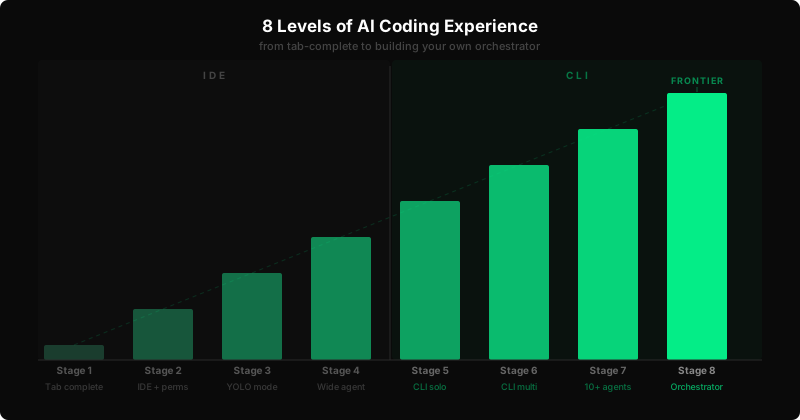
The 8 Levels of AI Coding Experience
Steve Yegge published a post called Welcome to Gastown that maps out how developers progress in their use of AI coding tools. It's the most accurate framework I've seen for where people actually are versus where they think they are. What it doesn't include is specifics — which IDEs, which tools, which habits belong to each level. This is that post.
Stage 1: Zero or Near-Zero AI
You have GitHub Copilot installed but mostly treat it as a fancy autocomplete. You occasionally paste a function into Claude.ai or ChatGPT to ask why it's broken. You might have Tabnine or Codeium for suggestions. You're skeptical or just haven't found the right use case yet.
Tells: You still write most of your code by hand. You check AI output very carefully. You've had a few "wow" moments but haven't changed your workflow.
Stage 2: Coding Agent in IDE, Permissions On
You've turned on agent mode — in Cursor, Cline, Windsurf, or GitHub Copilot Workspace. The agent can read files, write code, and run terminal commands. But it asks before each action. You approve every tool call.
Tells: You're nervous about the agent touching your filesystem. You cancel runs that feel too broad. You read every diff before accepting. This is where most developers are right now.
Stage 3: Agent in IDE, YOLO Mode
Trust goes up. You flip Cursor to auto-approve. You enable Cline's YOLO mode. You let Windsurf cascade through a multi-file refactor without stopping to ask permission. The agent's footprint in your session grows.
Tells: You've had your first "it just did the whole thing" moment. You still watch it run. You're starting to think in tasks rather than lines.
Stage 4: In IDE, Wide Agent
The IDE stops feeling like an editor. It's a surface where tasks arrive and diffs appear. You describe what you want, the agent builds it, you review the result. Cursor's composer fills most of your screen. You open files to understand what happened, not to write.
Tells: You write far more in natural language than in code. Code review is your main coding activity. You feel impatient when an agent asks clarifying questions you could have answered with five more words upfront.
Stage 5: CLI, Single Agent, YOLO
You've moved to Claude Code, Aider, or another terminal-based agent. One task at a time, no GUI, diffs scrolling by. You set it running on a feature and step away. You come back and either redirect or ship.
Tells: You have a preferred CLI agent. You've started keeping a task queue — a simple list of what to hand off next. You rarely get surprised by what the agent does.
Stage 6: CLI, Multi-Agent, YOLO
Three to five terminal panes running at once. Different features, different branches, different agents. You use git worktrees so they don't step on each other. You rotate attention across sessions like a foreman checking on crews. Output multiplies.
Tells: You've set up iTerm profiles or tmux layouts specifically for this. You think in parallel tracks. You're faster than anyone on your team and starting to notice it.
Stage 7: 10+ Agents, Hand-Managed
You push the limit of what one person can monitor. Ten or more Claude Code sessions, spread across a mix of features, fixes, and refactors. You have scripts that start sessions with context pre-loaded. You feel the coordination overhead — context switching, merge conflicts, reviewing parallel output — and you start thinking about how to eliminate it.
Tells: You've hit the ceiling of hand-management. You've written a shell script or two to help coordinate. You know exactly where the bottleneck is and it's you.
Stage 8: Building Your Own Orchestrator
You're writing code that runs agents. You're using the Claude SDK, LangGraph, or a custom loop on top of the Anthropic API to create workflows where agents spawn agents, verify each other's output, and resolve conflicts automatically. You're on the frontier.
Tells: You talk about "my orchestrator" the way a craftsperson talks about custom tools. You benchmark models for specific subtasks. You've read API docs you didn't strictly need to. You are, in Yegge's framing, in Gastown.
Most developers reading this are somewhere between stages 2 and 5. The jump from stage 2 to stage 3 is mostly psychological — turning off confirmations and accepting that the agent will occasionally do something you undo. The jump from 5 to 6 is ergonomic — a few hours of terminal setup. The jump to 8 is a career change.
The framework matters because it tells you what the next unlock is. If you're in stage 3, the question isn't which model is best — it's whether you're ready to stop watching. If you're in stage 6, the question isn't more agents, it's whether hand-management is becoming the bottleneck.
Where are you?
Actual AI helps engineering teams understand where their developers are in this progression and what it takes to move them forward.